Map Tracker & Location Share
HuanYoung Tech of SZMaps & Navigation
4.63.00 Reviews
- Version
- 1.1.2
- Installs
- 10.00K
- Age Rating
- Everyone
Screenshots
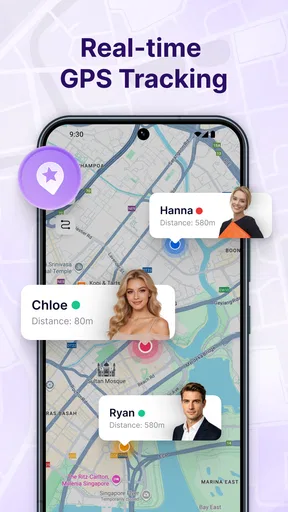
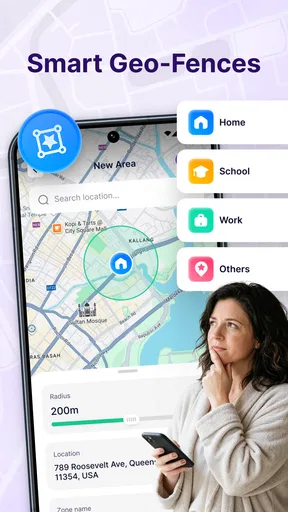
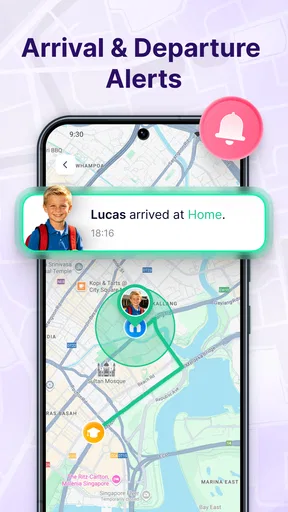
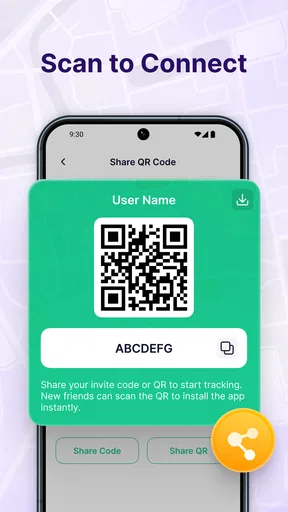
Our Review of Map Tracker & Location Share
 Analysis by Appyee
I like location-sharing apps most when they solve a very ordinary problem without turning it into a complicated routine. Map Tracker & Location Share is aimed at exactly that moment: I want to know whether a friend has arrived, whether someone has left, or where a small group is while plans are still moving. It sits in the Maps & Navigation category, is free to use, and is suitable for Everyone, so its appeal is easy to understand even before looking at the finer details.
After spending time with it, my impression is that this is a focused tool rather than an all-purpose navigation replacement. Its central idea is live location sharing combined with arrival and departure alerts. That makes it more useful for coordinating people than for planning a complete journey. I would recommend it to readers who want a lightweight way to keep track of shared plans, but I would not treat it as a substitute for a mature navigation suite, a family-safety platform, or a dedicated public-transport app.
How Map Tracker & Location Share feels in its current state
The current release is version 1.1.2, developed by HuanYoung Tech of SZ. It has passed the early discovery stage without looking like a heavily established platform: the app has more than ten thousand installs, an average rating of 4.6 from thirty-six ratings, and three written reviews. Those numbers suggest encouraging early reception, but they also tell me to keep expectations sensible. A small user base can reveal that the basic idea works while leaving many unusual situations untested.
In practical terms, the app is built around a simple question: where are the people involved in this plan, and has someone crossed the point that matters? That point might be a home, a meeting place, a school, a workplace, or another destination. The arrival and departure alerts are more important than the map itself because they reduce the need to repeatedly open a conversation and ask for updates.
That distinction matters. A map can show a position, but a useful alert changes the way I behave. Instead of checking a moving marker every few minutes, I can wait for the event that affects me. This is especially convenient when I am preparing dinner, driving, working, or handling another task where constant checking is distracting.
The app requires Android 7.0 or later, which keeps it accessible to many older devices. It is free, and the Everyone content rating makes it approachable for mixed-age households. I would still introduce it carefully to younger users, not because of the rating, but because location sharing is a privacy decision rather than an ordinary map setting.
What the main idea gets right
The strongest part of this concept is its event-based usefulness. If I am meeting a friend at a busy place, a live position can help me understand whether they are nearby, while an arrival alert can tell me when I should stop browsing and head toward the entrance. For a household, a departure notification can be more helpful than a vague message such as “leaving now,” because it creates a clearer shared signal.
I also like the possibility of using the app for temporary coordination instead of permanent observation. A weekend outing, a group dinner, or a pickup arrangement does not necessarily require a long-term tracking system. The best workflow is to create the sharing arrangement for the specific plan, agree on who needs to see it, and then stop using it when the plan is over. That habit keeps the tool practical and limits unnecessary exposure.
One non-obvious benefit is that alerts can shift responsibility away from the person who is waiting. In many group plans, one person becomes the unofficial coordinator, repeatedly sending messages such as “Are you close?” and “Did you leave yet?” A location-based alert gives that person a more reliable trigger. It does not eliminate communication, but it can remove a surprisingly repetitive part of it.
A realistic everyday scenario
Imagine that I am picking up a friend after work. We have agreed on a destination, but the timing is uncertain because the friend may need to finish a task before leaving. With ordinary messaging, I might receive several incomplete updates, or I might arrive too early and wait. With Map Tracker & Location Share, the useful sequence is different: the friend shares their location for the arrangement, I wait for a departure signal, and I use the live map only when the timing becomes relevant.
That workflow is not about watching a person continuously. It is about making a flexible plan easier to manage. If the friend leaves later than expected, I have information that helps me adjust. If they arrive at the agreed place, the alert can prevent the awkward moment when both people are nearby but still trying to locate each other through messages.
For a family, a similar approach could help with a planned return home. For friends walking to a venue from different directions, it could make the final meeting easier. For a small group on an outing, it could provide a shared sense of progress without asking everyone to send manual updates. These are modest use cases, but they are exactly where a focused app can earn a place on a phone.
What the current version suggests about its development
Version 1.1.2 indicates that the product has already moved beyond its first public build, and the release date is May 19, 2026. I see that as a sign of an app still establishing its direction rather than one with a long, settled history. The important question is not whether a version number sounds advanced; it is whether the current release makes the central sharing-and-alert workflow dependable in daily use.
The evolution visible here is best understood as refinement around a narrow purpose. The app is not presenting itself as a huge navigation ecosystem with many unrelated tools. Its identity remains tied to location sharing, arrivals, and departures. That focus can be a strength if future updates improve clarity and reliability instead of adding a collection of features that make a simple task harder.
For existing users, the current version should be judged by the moments that matter most: setting up a share, understanding who can see the location, recognizing when an alert is active, and ending the arrangement afterward. A small improvement in any of those steps can have a bigger effect than a visually impressive map change. When an app deals with personal location, clear status information is more valuable than decoration.
I would also pay attention to how the app behaves when plans change. Real people do not follow perfectly fixed routes. A friend may stop somewhere, turn back, lose signal, or change the meeting place. An arrival alert is useful only when the destination is understandable and the resulting notification is timely enough to support a decision. This is where the difference between a promising concept and a dependable daily tool becomes visible.
How it affects people already using it
For someone already relying on the app, the biggest practical gain is reduced checking. Instead of opening a map simply to see whether anything has changed, the user can organize the situation around meaningful events. I find that especially helpful for people who dislike constant messaging but still need coordination during a shared activity.
There is also a social advantage. Asking someone to share a location can feel intrusive when the reason is vague. Framing it around an arrival or departure plan makes the request more specific: we are using this for the journey or meeting, not treating the person’s entire day as an open feed. That distinction should be explained openly between the people involved, because technical access and personal comfort are not the same thing.
A useful habit is to name the purpose of each sharing session in the conversation around it. I might say that I need the location only while traveling to the meeting point, or that I want a departure alert so I can leave at the right time. This is not a feature claim; it is a user practice that makes the app safer and less confusing. It also makes it easier to notice when a sharing arrangement is no longer needed.
Another practical tip is to treat the alert as a prompt for action, not as proof that every detail of the journey is complete. If I receive an arrival notification, I should still check the agreed meeting spot when the location is crowded or ambiguous. Likewise, a departure alert tells me that movement has begun, not that the person will reach me at an exact minute. That small distinction prevents overconfidence.
Where it fits beside ordinary alternatives
The usual alternative is messaging. A chat is better when the plan is changing rapidly, when people need to discuss details, or when the group wants a written record of decisions. Map Tracker & Location Share is better when the main problem is waiting for a location event and nobody wants to keep sending updates. In my view, the two approaches complement each other rather than compete directly.
A full navigation app remains the better choice when I need turn-by-turn directions, route alternatives, traffic context, saved places, or detailed travel planning. This app’s value is the relationship between people and destinations, not the depth of road guidance. I would use a navigation tool to get somewhere and this app to coordinate with the people I am meeting there.
It also occupies a different space from a long-term family-tracking service. Those services may be designed around persistent groups, history, safety controls, and broader household management. Map Tracker & Location Share makes more sense to me for a specific plan or a smaller coordination need. If a reader wants extensive family administration, this focused approach may feel too limited.
For a workplace, school, or event organizer, I would be cautious about treating it as a formal attendance system. Location sharing can help a few people coordinate, but it should not automatically become a substitute for clear schedules, consent, or direct communication. The app is most comfortable in personal situations where everyone understands why the location is being shared.
Privacy, consent, and the habits that make it work
Location information is sensitive even when an app is free and easy to install. Before using it with friends or family, I would explain who is expected to see the location, what event the sharing supports, and when everyone intends to stop. A person should be able to say no without being made to feel uncooperative. That conversation is part of using a location-sharing tool responsibly.
I would avoid creating a permanent routine when a temporary one is enough. For a single pickup, dinner, or group walk, the sharing should match that limited purpose. I would also avoid sharing with a broad group merely because the app makes it possible. The smallest audience that solves the problem is usually the best audience.
There is a second privacy issue that is easy to overlook: notifications can appear at inconvenient times or on a device that other people can see. If the phone is shared, displayed publicly, or connected to a car screen, an arrival or departure message may reveal more than intended. I would review notification behavior during a low-stakes plan before depending on it for a sensitive situation.
Remaining gaps and situations where I would skip it
The early scale of the app is the main reason I would test it before making it part of an important routine. A rating average of 4.6 is encouraging, but thirty-six ratings are still a small sample. That does not make the app unreliable; it simply means my confidence would come from trying the exact scenario I care about rather than from assuming broad maturity.
I would skip it if my main need is detailed navigation. Someone planning a long drive, comparing routes, checking transit connections, or finding a place through rich map information will probably be happier with a conventional navigation service. The location-sharing focus does not replace those tools.
I would also look elsewhere if I needed extensive historical records, formal group administration, or a highly developed family-safety system. Those needs involve more than knowing whether someone has arrived or departed. A focused app can be easier to understand, but that simplicity becomes a limitation when the job expands.
Another gap is the human side of alerts. No notification can solve a poorly agreed destination, an unclear meeting point, or a person who changes plans without telling the group. I would always keep a basic communication channel available. The app can reduce unnecessary messages, but it should not become the only way people coordinate.
Before depending on it for a time-critical meeting, I would run a short test with a trusted contact. I would check whether both people understand the map, whether the alert appears in a useful moment, and whether ending the sharing arrangement is obvious. This is one of the most valuable practical tests because it exposes confusion before it affects a real airport pickup, appointment, or crowded event.
What I would watch as the product develops
Future progress should be measured by trust and clarity rather than by the number of extra controls. I would watch for improvements that make sharing status easier to understand, make alerts more predictable, and help users finish a session cleanly. Those changes would directly strengthen the app’s central purpose.
I would also look for evidence that the developer, HuanYoung Tech of SZ, is responding to the needs of a growing audience without losing the straightforward character of the product. As more people use a location tool, edge cases become more important: changing destinations, interrupted journeys, crowded places, and users who want a quick temporary share rather than an ongoing arrangement.
The most valuable evolution would be careful handling of the boundary between convenience and surveillance. Clear controls, understandable notifications, and respectful sharing flows would make the app easier to recommend. By contrast, adding complexity without explaining who can see what would undermine the very simplicity that makes the concept attractive.
For now, I see Map Tracker & Location Share as a promising, narrowly focused option for everyday coordination. Its free price, accessible age rating, and support for Android 7.0 or later lower the barrier to trying it. The early rating is positive, but the modest audience means I would form my own opinion through a small test first.
My recommendation is straightforward: try it if your recurring problem is waiting for friends or family to leave or arrive, and if everyone involved is comfortable with temporary location sharing. Keep a normal messaging app and a full navigation app for the jobs this tool does not cover. Used in that focused way, it can remove a lot of needless checking while keeping plans easier to follow.
Verdict
Strengths of Map Tracker & Location Share
- Real-time location sharing helps coordinate trips, meetups, and family plans.
- Location updates can make it easier to monitor a route while traveling.
- Useful map view for checking shared locations at a glance.
- Can reduce the need for repeated calls or messages about arrival times.
- Practical for groups that need basic location coordination on the go.
Limitations of Map Tracker & Location Share
- Continuous GPS use may noticeably reduce battery life during active tracking.
- Location accuracy can drop indoors or in areas with weak GPS coverage.
- Sharing location data may raise privacy concerns for some users.
- Reliable tracking generally requires a stable mobile data connection.
- Background location permissions may feel excessive for occasional use.
Similar Picks in This Category
View All
Uber - Request a ride
Uber Technologies, Inc.4.7


inDrive. Rides with fair fares
® SUOL INNOVATIONS LTD4.8

Yandex Go: Taxi Food Delivery
Mikromobilnost LLC Belgrade4.8

Bolt: Request a Ride
Bolt Technology4.8

Rapido: Bike-Taxi, Auto & Cabs
Rapido Bike Taxi4.8
Frequently Asked Questions
What is Map Tracker & Location Share used for?
Map Tracker & Location Share is designed to help you share your current position and keep track of locations through a map-based interface. It can be useful for meeting friends, coordinating with family, monitoring a journey, or letting someone know where you are. Before downloading, remember that its usefulness depends on accurate GPS, an internet connection, and the permissions you choose to grant.
Does Map Tracker & Location Share require GPS and internet access?
Yes, the app generally needs location services enabled to determine your position, while mobile data or Wi-Fi is usually required to send and update location information. GPS accuracy can change depending on buildings, weather, battery-saving settings, and your surroundings. If the signal is weak or the connection is interrupted, the map may show an outdated position or take longer to refresh.
Can I control who sees my shared location?
Location sharing should be used carefully, and you should only share your position with people you trust. Check the app’s sharing screen and privacy settings before sending an invitation or link, and review whether sharing is temporary or remains active until manually stopped. It is also a good habit to end a session when you no longer need others to follow your location.
Will Map Tracker & Location Share drain my phone battery?
Continuous location tracking can consume more battery than ordinary map browsing because the phone must regularly use GPS, mobile networks, and background activity. The effect depends on how frequently the location is updated and how long tracking remains active. To reduce consumption, stop sharing when finished, lower the update frequency if available, and keep battery-saving restrictions in mind.
Is Map Tracker & Location Share free to download and safe to use?
The app may be available as a free download, but some features could depend on advertising, in-app purchases, account requirements, or platform-specific limitations. Before installing, review the store listing for current pricing and permissions. From a safety perspective, location data is sensitive, so read the privacy information, avoid sharing publicly, and grant only the permissions necessary for the features you intend to use.
